How to post a good ask
Pick the type, say it in one line, add details, then set the area, timing and budget.
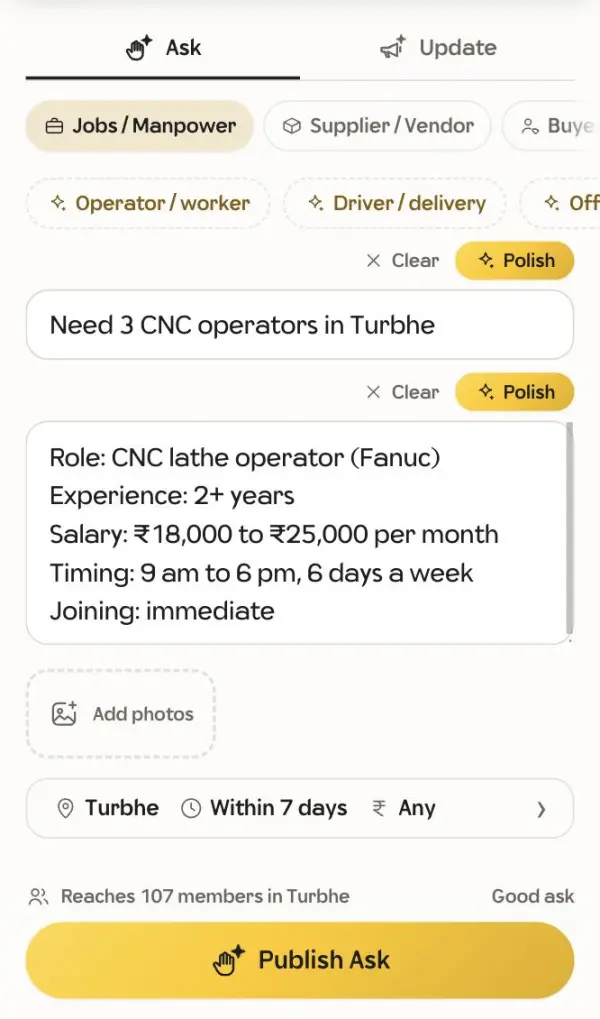
- Tap Ask in the bottom bar (or the side bar on a computer).
- Choose the type: Jobs / Manpower, Supplier, Buyer, Logistics, Space and more. The type decides who gets your ask.
- Write a one-line title, for example: Need 5 CNC operators in Turbhe.
- Add details: quantity, quality, timing, and anything that rules people in or out.
- Optional: add photos (a drawing, a sample, the site).
- Tap the location, timing and budget row to set the area, how far your ask reaches, how soon you need it and your budget.
- Check how many members it reaches, then tap Publish Ask.
Tips
- Templates under the type give you a ready example. Replace the words in [brackets] with yours.
- Polish tidies up your spelling and wording. Check the result before you use it.
- If you leave the page, your unfinished ask is kept on this device. Tap Continue the next time to pick it up.