Find your way around Connect
Updates at the top, asks below, and what the chips and buttons on each ask mean.
Connect is your home feed. Asks that fit your business, area or job search come first.
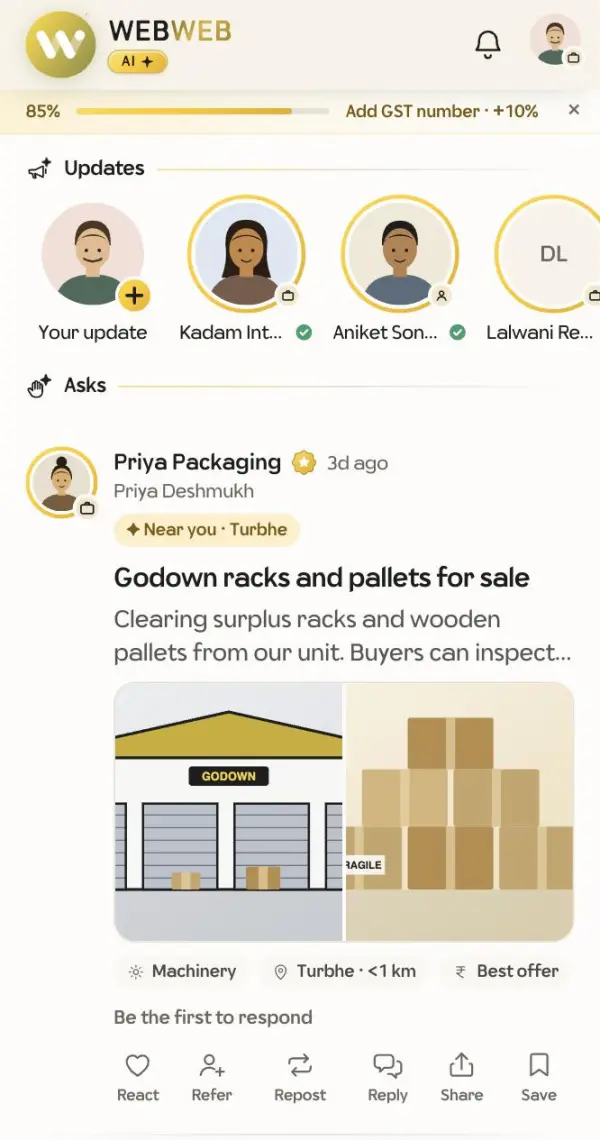
On each ask
- The gold tag, such as Near you · Kharghar, says why you are seeing it.
- The chips show the type, the area and its distance from you, the budget and how soon it's needed. Tap a chip to find similar asks.
- The response log shows who has answered and when. It never shows what they shared.
The buttons
- React: heart, thumbs up or namaskar. Double-tap an ask to give a thumbs up.
- Refer: share a contact from your phone book.
- Repost: show the ask on your own page.
- Reply: answer with your contact, a photo or a note.
- Share: send the ask's link on WhatsApp or anywhere else.
- Save: keep it in Saved asks.